 PocketMap
Works on Windows 10 and 11 · laptops and Windows tablets
Your readings on the drawing.
Your report in one click.
The Windows software for HVAC commissioning engineers. Place your measurements, observations and photos directly on the site drawing, with several people on the same drawing: PocketMap keeps the team in sync, fills in the Excel sheets and prepares the PDF report for you.
- No card required
- Windows 10 and 11
- Drawings shared between technicians
- Works offline
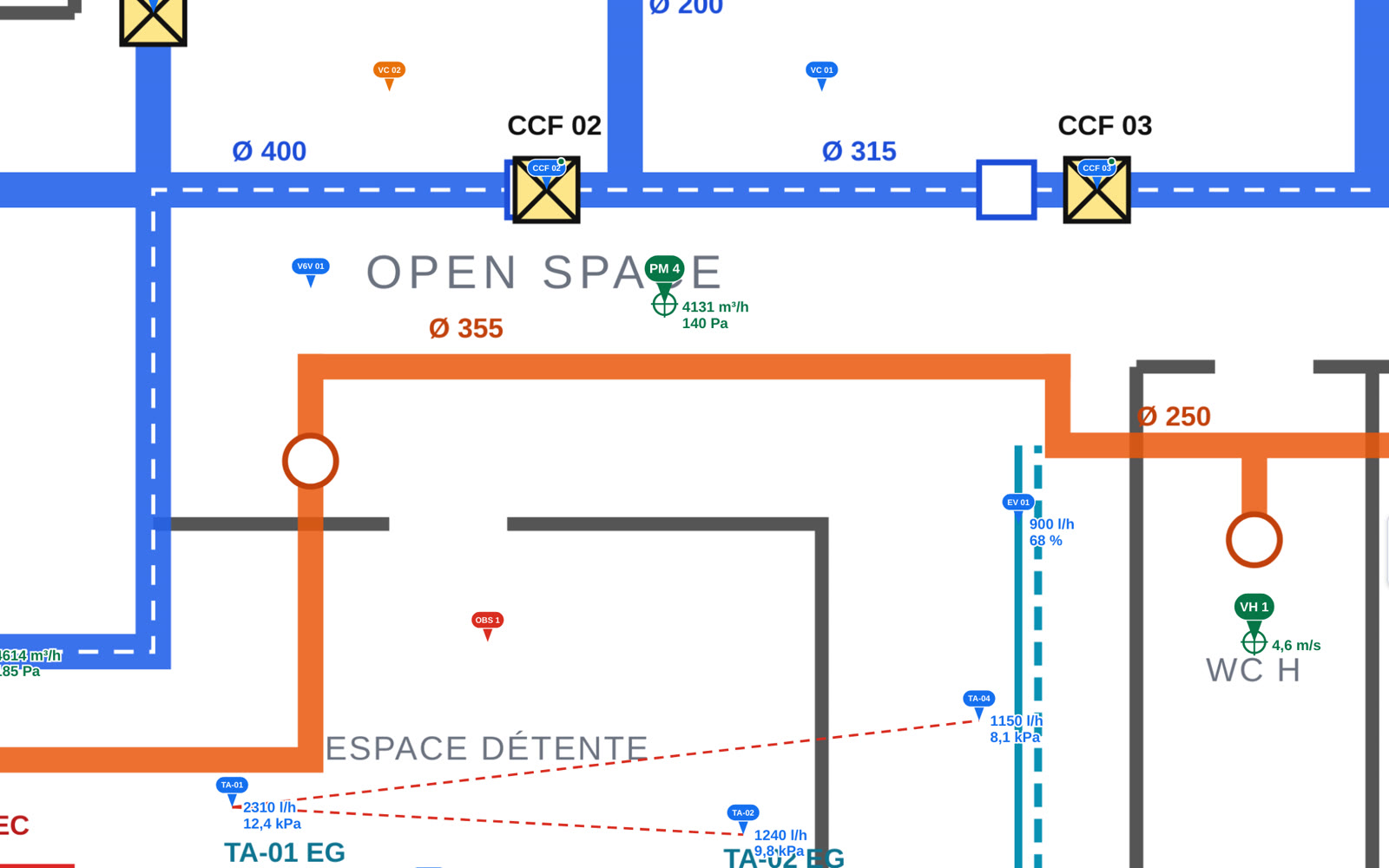
In 40 seconds
PocketMap on video
Teamwork
One drawing for the whole team, without ever overwriting anyone’s work
On a shared project, every technician records readings on the same drawing from their own PC. PocketMap merges everyone’s readings automatically, each time the PC goes online. No more paper drawings passed around and files called “final version 3”.
Collaborative drawings
Every technician on site works on the same drawings, each from their own PC: same tags, same tasks, same to-do list.
Nothing is ever overwritten
Each person’s readings are added to the others’ instead of replacing them. If a colleague re-measures a point, their version is added to that tag’s history, with their name.
Automatic sync
As soon as the PC is online, PocketMap uploads your readings and downloads the team’s, on its own. In the basement you keep working offline: everything is sent once the connection is back.
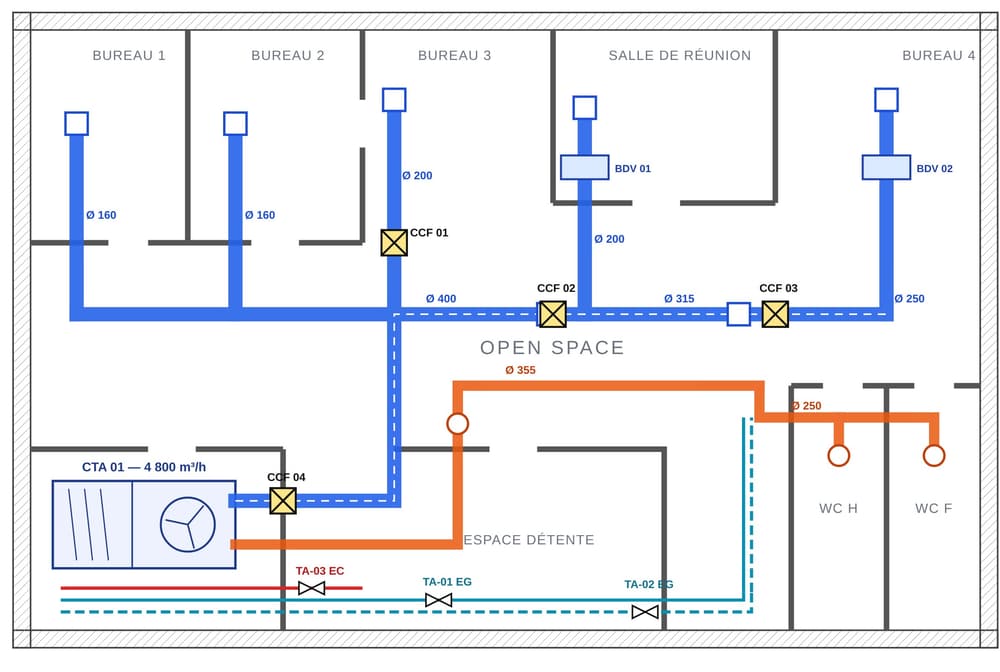 Shared drawing · in sync
Time saved
No more evenings spent copying out readings
On a commissioning job, the longest part is not taking the measurements: it is everything that comes afterwards. PocketMap does away with re-typing and formatting.
Readings written on paper or on a printed drawing, then typed up in the office in the evening.
Every measurement is entered on site, directly on the drawing, at the exact location of the point.
Excel sheets filled in by hand, one per system, with copying errors.
The Excel sheets fill themselves in from what you have entered.
A report that takes hours to put together: drawing screenshots, tables, photos, contents page.
The PDF report is ready in one click: marked-up drawings, tables, photos and a numbered contents page.
Features
Designed by a commissioning engineer, for site work
Everything a commissioning job needs, in a single piece of software.
Airflow measurements
In-duct measurement points (cross-section, velocity, airflow, pressures) and index-run static pressure linked to its branch. Totals per system are calculated automatically.
Hydronics and TA valves
Design and measured flow rates, valve setting (turns), chilled or heating water circuit. Valves are linked upstream / downstream: PocketMap checks that the branch flow covers the sum of its valves.
Fire dampers, VAV boxes, volume dampers
Check sheets for fire dampers, VAV boxes and volume control dampers. The icon turns green or red depending on the answers: faults stand out at a glance.
AHU, ventilation, smoke extract and pump sheets
Complete equipment data sheets, with an HVAC symbol drawn on the drawing for each recorded characteristic.
Automatic tagging
PocketMap reads the drawing and finds the equipment tags (fire dampers, VAV boxes, TA valves, two-way valves, dampers…) to place the points for you.
Tailor-made PDF report
Preview as real A4 pages, sections you can reorder or hide, added text and title pages. The contents page numbers itself.
Completed Excel sheets
Your standard sheets are filled in, one per system, ready to send or archive.
Collaborative drawings
Invite your colleagues by email: everyone records on the same drawing without overwriting the others’ readings. Automatic sync every time you go online.
Offline in the basement
No signal in the plant room or car park? Work as usual: everything syncs as soon as the PC is back online.
On site
One sheet per point, filled in on site
Click on the drawing and the sheet opens alongside. Tag, circuit, flow rates, setting: you enter it once and PocketMap does the rest — Excel sheet, report table, flow checks.
- Dampers shown green or red according to the answers
- Valves linked upstream / downstream, flow rates checked
- Photos attached to the point, included in the report
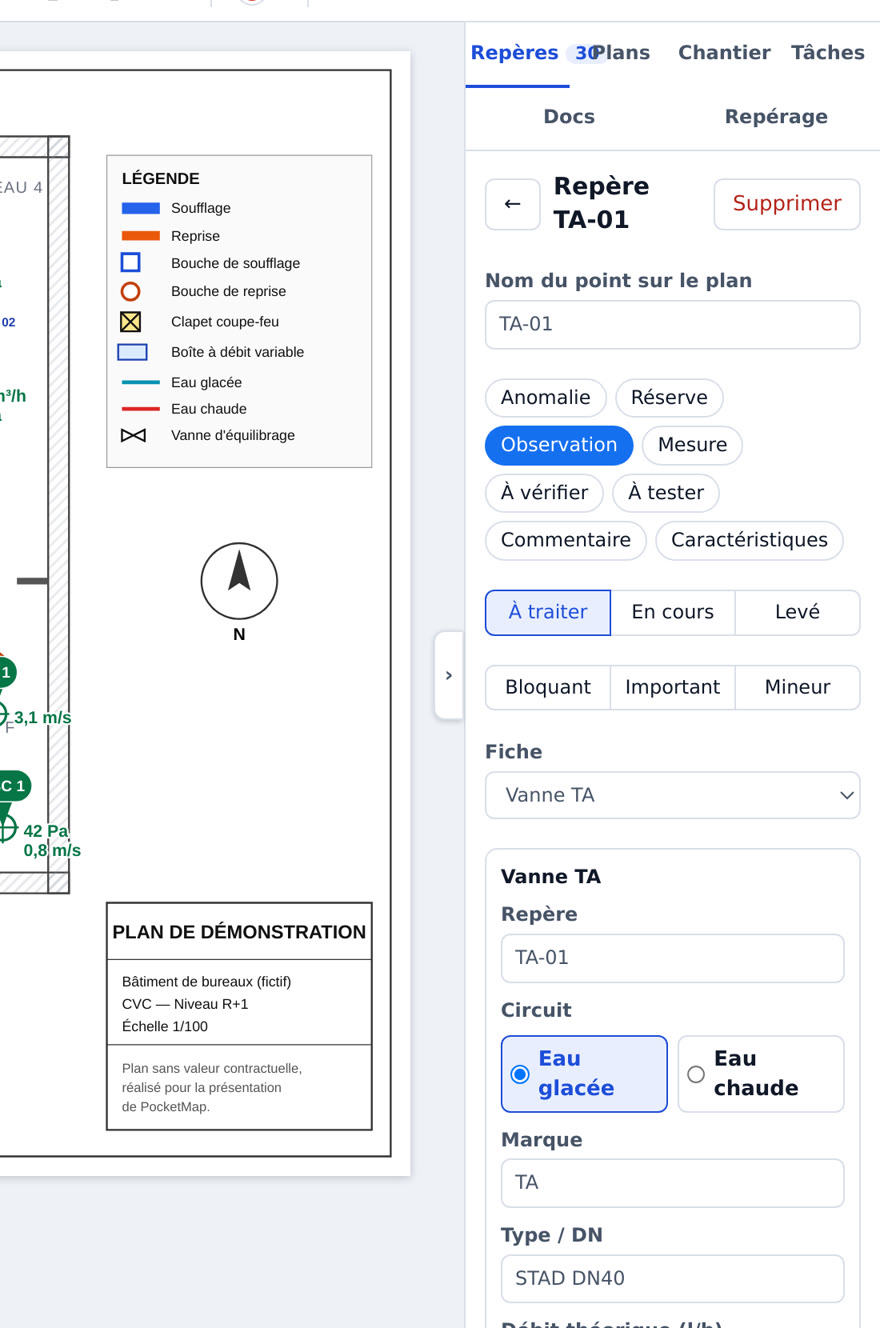
How it works
Three steps, from drawing to report
Open the drawing
Import the PDF of the site drawing. A project can hold as many drawings as you need, each with its own name.
Place your readings
One click on the drawing, one sheet to fill in: measurement, observation, photo, task for the team. Everything stays where it belongs.
Produce the report
PDF report and Excel sheets generated from your entries. You check them, you send them.
Pricing
One simple, all-inclusive price
One licence per PC, valid for 12 months. No hidden subscription, no paid add-ons.
PocketMap licence
€499net / seat / year
VAT not applicable, article 293 B of the French General Tax Code
- Every feature, no paid add-ons
- Lifetime updates included
- Projects shared between your seats
- Unlimited PDF reports and Excel sheets
- Works offline
- Email support
Free trial
Try PocketMap for 10 days on your next project
Every feature, no credit card. You receive your trial code and the download link by email. When the trial ends, your projects are kept.
- Personal trial code, valid for 10 days
- On a PC that has never run PocketMap before
- One trial per email address
Download PocketMap for Windows
Latest version for Windows 10 and 11. The software asks for a trial or licence code the first time it starts.
Frequently asked questions
Everything you need to know
Which computers does PocketMap run on?
Windows 10 and 11 PCs, laptops and Windows tablets alike. An internet connection is needed to activate the licence the first time, then only to share projects.
How does the free trial work?
You enter your email address and receive a trial code valid for 10 days, plus the download link. The trial runs on a PC that has never used PocketMap before, with every feature. No credit card is required.
What happens when the trial ends?
The software locks, but your projects stay on your PC. Buy a licence, paste the code you receive by email, and you pick up exactly where you left off.
What is a “seat”?
A seat is a PC on which PocketMap is activated. A 3-seat licence lets you equip 3 of your company’s PCs with the same code. A replaced PC can be released on request.
Can several technicians work on the same drawing?
Yes, that is what it is built for. On a shared project, everyone records from their own PC and PocketMap merges everyone’s readings without ever overwriting a colleague’s. Sync is automatic whenever you are online; offline, you keep working and everything is sent as soon as the connection returns.
How does renewal work?
You are notified by email 15 days before your licence expires. Renewal is done on this page; the new period starts when the current one ends, so you never lose a day.
Will I receive an invoice?
Yes, the invoice is emailed automatically after payment, in your company’s name. The price is €499 net per seat per year (VAT not applicable, art. 293 B of the French CGI).
Where is my data stored?
Your projects are saved on your PC, in a single .pocketmap file per project. Shared projects go through the PocketMap server and are only visible to the people you invite.
Who designed PocketMap?
An HVAC commissioning engineer, first of all for their own team. PocketMap is used on that team’s commissioning jobs and evolves with feedback from site.
Your next report could be ready tonight.
Install PocketMap, place your readings on the drawing and let the software do the formatting.
Any questions? pocketmap@metteuraupoint.fr